
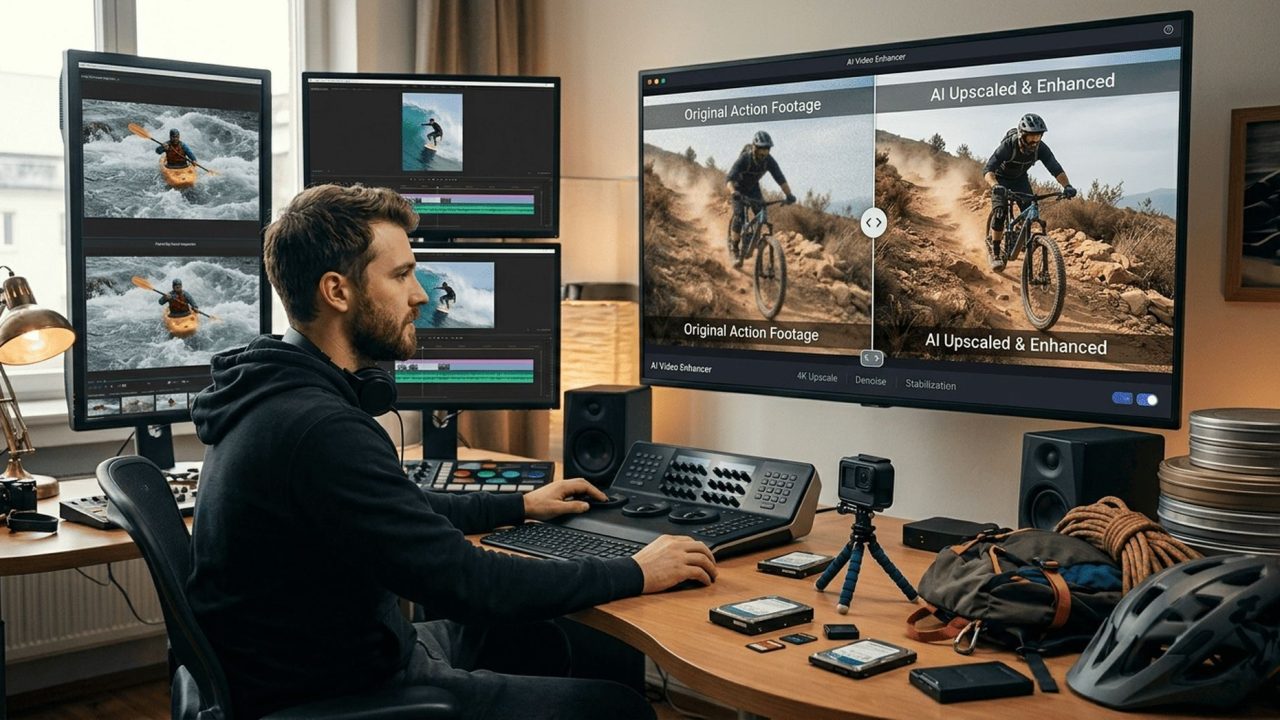
There is a hard drive in most enthusiast households containing several hundred gigabytes of footage nobody will ever watch.. It came from a GoPro two generations old, a first drone bought before anybody knew what they were doing, a gimbal used properly twice. The trips were good, the moments were real, and the footage sat there long enough that current phones now shoot something noticeably sharper.
Every year that passes makes it look older, and every year the intention to do something with it gets quieter.. The interesting thing about that drive is that the footage is rarely as bad as it looks. Action cameras and drones capture under specific constraints that produce specific, recoverable problems, and an AI Video Upscaler designed for footage enhancement through Higgsfield addresses most of them..
Why does action camera footage age faster than other video?. Because the compromises that make an action camera possible are the same ones that show up first when standards move.. A camera that survives being strapped to a helmet has to be small, and small means a physically tiny sensor gathering a limited amount of light.
It has to run for hours on a battery that fits in a pocket, which constrains processing. It has to record onto a memory card without filling it in twenty minutes, which means aggressive compression happening inside the camera before the file ever exists.. None of those decisions were wrong.
They are what made the category work, and the footage looked genuinely good against the displays and platforms of the time. But a phone screen from three years later resolves more detail than the compression preserved, and the gap shows immediately.. That is a different situation from a badly shot video.
The composition was fine, the moment happened, the camera was pointed in the right place. What degraded was the container, and that is the part an AI Video Upscaler is built to address.. What is actually wrong with the files?.
Four things, and they compound rather than sitting independently.. Compression artefacts come first, because in-camera encoding at a modest bitrate discards detail permanently to keep file sizes manageable. On fast moving footage, which is most of what these cameras shoot, the effect is strongest exactly where the interest is: water, foliage, snow spray, anything with fine texture in motion..
Sensor noise follows. A small sensor in anything other than bright sunlight produces grain, and the camera’s own noise reduction smears fine detail while trying to remove it. Golden hour drone footage, which is when most people fly, sits squarely in this problem..
Then there is resolution itself. Footage from earlier generations of hardware was frequently captured at a standard that felt generous at the time and now sits below what a current phone records, let alone what a large display expects.. And finally atmospheric haze on drone material, where distance between the camera and the subject flattens contrast in a way that looks like a soft lens but is actually air..
An AI Video Upscaler works on all four at once, which matters because addressing one in isolation tends to make the others more visible.. Why does slow motion suffer most?. Because high frame rates and high resolution compete for the same bandwidth, and the camera resolves that competition by giving up resolution..
Anybody who has shot slow motion on an action camera has made this trade without necessarily noticing. The highest frame rate modes almost always drop to a lower capture resolution, because writing that many frames per second at full resolution is beyond what the hardware or the card can sustain.
The result is beautifully smooth footage that is visibly softer than everything else on the timeline.. That is frustrating because slow motion is frequently the best material on the drive. It is where the jump, the splash, the landing and the wipeout live, and it is the footage people most want to use..
This is also where an AI Video Upscaler produces the most obvious improvement, since the problem is purely resolution rather than anything that happened in front of the lens. The motion is already smooth. What is missing is detail, and detail is precisely what these tools reconstruct..
What does stabilisation cost you?. More frames than most people realise, and it is worth understanding because it explains a lot.. Electronic stabilisation works by capturing a wider image than it displays and then moving the visible window around within it to counteract shake.
The steadier the result, the more margin it needs, which means the more of the captured frame is discarded.. On footage shot with strong stabilisation enabled, the image you end up with is a crop of what the sensor recorded, at a correspondingly lower effective resolution. Combine that with a high frame rate mode and the compression already discussed, and a clip can arrive at the edit considerably softer than the camera’s headline specification suggested..
None of that is a fault. The stabilisation is why the footage is watchable at all. But it does mean that running the material through an AI Video Upscaler is recovering resolution that the stabilisation spent, rather than inventing something that was never there in spirit..
How much does an AI Video Upscaler genuinely recover?. Enough to change what the footage is usable for, which is a more honest way to put it than a multiplier.. The strongest results come from the problems described above, because they are systematic rather than random.
Compression artefacts follow predictable patterns. Sensor noise has a recognisable character. Resolution loss from a known capture mode is consistent across every clip shot that way.
An AI Video Upscaler trained on large volumes of matched footage handles systematic problems considerably better than it handles one off ones.. In practice that means clips from a single trip, shot on one camera in one mode, respond similarly, which is why this works better as a batch job than as a rescue mission on individual files..
What comes back is footage that sits comfortably alongside current material rather than announcing its age. Not indistinguishable from something shot today, and not needing to be. The bar is whether a viewer notices the difference mid video, and recovered action camera footage clears that bar more easily than most people expect..
Why upscale before cropping vertical?. This sequencing point is worth more than any setting, and it is routinely done in the wrong order.. Almost all action and drone footage was shot widescreen, because that is what the cameras default to and what people were filming for.
Almost all short form video now wants vertical, which means taking a tall crop out of a wide frame and discarding everything either side.. That crop keeps a narrow central strip of the original. Doing it before the AI Video Upscaler runs produces something unusable, which is how most people conclude their old footage cannot be repurposed and stop there..
Reverse the order and the arithmetic changes completely. Run the full frame through an AI Video Upscaler first, then take the vertical crop from the higher resolution version, and the strip you keep starts from a much better place. Footage that failed as a vertical becomes perfectly acceptable, and a drive full of widescreen material becomes usable on platforms it was never shot for..
How does Higgsfield handle a drive full of clips?. Higgsfield is an AI creative suite, which means the processing, the trimming and the export live in one place rather than across three applications.. For this particular job the batch handling matters most.
An archive is fifty or a hundred clips rather than one, and pointing an AI Video Upscaler at all of them together with consistent settings is the difference between a project that finishes and one abandoned after the first three files. Footage from the same camera in the same mode responds to the same treatment, so grouping by source rather than by date is the faster route through..
Consistency across the set matters almost as much. Material from a phone, a drone and an action camera, all shot on the same trip, otherwise cuts together badly because each source looks different. Bringing them to a common standard in one pass is what makes a single edit possible..
Beyond that, Higgsfield keeps the originals separate from the processed versions, which sounds administrative and turns out to be the thing people most regret skipping. It produces the format variants from each recovered file, so the widescreen version for YouTube and the vertical for everything else come from one operation.
And it runs in a browser, which for a task most people undertake once a year removes any question of whether it justifies installing something.. What is worth recovering and what is worth deleting?. A sorting pass first saves a great deal of processing, and the criterion is replaceability rather than quality..
Footage of a place you will return to is worth less than footage of a place you will not. A trip that can be repeated, a location half an hour away, a subject you can film again next weekend. That material competes with what you could shoot today on better hardware, and mostly loses..
What cannot be repeated is where the value sits. A trip taken once, a person who was there, a condition that happened to occur, a piece of equipment or a place that has since changed. That footage has no competition from anything you could film now, which makes even mediocre material worth the processing..
The other category worth keeping is anything with people in it, for reasons that have nothing to do with resolution and everything to do with what people actually rewatch years later.. Everything else can go. An AI Video Upscaler is fast but it is not free of effort, and a drive halved before processing is a project twice as likely to be completed..
What does a first session look like?. An evening, and worth structuring so it produces something rather than just processing.. Pick one trip rather than one camera.
A single trip gives you a natural edit at the end of it, which is what turns this from file management into something with a result. Pull everything from that trip regardless of source, sort out the clips worth keeping using the criterion above, and group what remains by camera and capture mode..
Run the largest group through the AI Video Upscaler first, since the settings that work there will mostly carry to the rest. Look at one recovered clip properly at full size before committing the batch, because five minutes of checking saves reprocessing everything.. Then cut something short from the result.
Two minutes is plenty. The point of the first session is to produce one finished thing from footage that has been sitting unused, because that outcome is what determines whether the rest of the drive ever gets touched.. What does this cost?.
Modestly, and the comparison worth making is against the hardware already bought.. Higgsfield operates a free tier, which is enough to process a handful of clips and judge the results against your own footage before spending anything. Paid plans cover the volume an actual archive project needs, and AI Video Upscaler pricing scales with resolution and clip length, so a sorting pass beforehand has a direct effect on what a project costs..
Everything runs in a browser, so there is nothing to install and no workstation requirement. And the terms per plan are published, which is worth a look if any of the recovered material is destined for a monetised channel.. The honest framing is this.
Most of the money in that drawer went on cameras, drones, gimbals, mounts, cards and batteries. The footage they produced is the return on that spending, and a good deal of it is currently sitting unwatched because of a problem that takes an evening to fix.. Conclusion.
The footage on that drive did not get worse. Displays improved, platforms changed shape, and the compression that kept file sizes reasonable in the first place left less to work with than anybody realised at the time.. Almost all of that is recoverable.
An AI Video Upscaler handles the compression, the sensor noise, the resolution lost to stabilisation and the softness of high frame rate modes, and Higgsfield processes the set together so a trip becomes one consistent edit rather than fifty mismatched files.. Pick one trip. Keep only what cannot be filmed again.
Then cut two minutes from it, because the footage was always the reason for buying the camera.. Tags: trends